os-lab0
本文最后更新于 2024年9月6日 下午
1.思考题
0.1
README.txt位置:
cat Untracked.txt:位于Untracked区
cat Stage.txt:Staged区。
cat Modified.txt:modifed区。
0.2
add the file 、stage the file 和
commit 分别对应的是 Git 里的 git add,git add,git commit命令
0.3
1 | |
0.4
用git reset --hard 进行版本回溯,功能很强大,但是一旦使用,就没有后悔药。
0.5
执行结果:
1.在shell命令行中输出:first
2.output.txt文件中为:second
3.output.txt文件中为:third
4.output.txt文件中为:
1 | |
0.6
1 | |
test的第1行打印了Shell Start… test的第2行打印了set a=1
test的第3行给变量a赋值为1 test的第4行打印了set b=2
test的第5行给变量b赋值为2 test的第6行打印了set c=a+b
test的第7行进行了c=a+b的运算 test的第8行打印了c=3
test的第9行打印了save c to ./file1
test的第10行把c的值重定向到了file1中
test的第11行打印了save b to ./file2
test的第12行把b的值重定向到了file2中
test的第13行打印了save a to ./file3
test的第14行把a的值重定向到了file3中
test的第15行打印了save file1 file2 file3 to file4
test的17,18,19行把file1,file2,file3的内容全部重定向到了file4中
test的第20行打印了save file4 to ./result
test的第21行把file4的内容重定向到了result中
2.难点分析
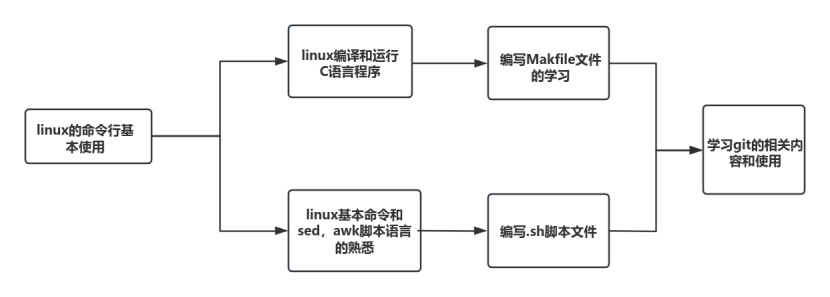
- linux的shell界面不是直观的图形界面,而是用命令行进行所有的任务,一开始难以适应。
- linux中有基本的命令,有许多的脚本命令,还有一些强大的工具命令,初学的命令较多,而且命令的不同参数有不同作用,容易搞混淆,这让不太熟练的初学者感到吃力。
- 对于Makefile的理解要到位,特别是不同target之间的依赖关系。
- 要学会熟练运用sed和awk等脚本语言的基础命令。
3.实验体会
lab0我们主要对linux系统的命令行操作进行了简单的学习和熟悉。学习了GCC,Makefile,Git等等强大工具的基本使用。我能够明显体会到linux系统与windows系统的不同,Linux系统拥有强大的命令行工具和脚本语言,可以提高工作效率和灵活性。但强大的功能需要我们付出很高的学习成本,许多的命令需要多用多练,在脑中形成长期记忆,才能熟练掌握。
本次实验还带我们回忆了c语言和mips的内容,需要我们再一次回顾计组的内容,在学习OS的过程中起到承上启下的作用,也便于我们更好地理解OS的底层原理。
| git branch -l # 查看所有分支 |
|---|
| git checkout |
| git checkout -b |
| git merge [ |